
This view of the Owner's Manual contains the very latest information, which may vary slightly from the printed Owner's Manual originally provided with your vehicle. It may also describe content that is not on or operates differently on your vehicle. Please consider the Owner's Manual originally provided with your vehicle as the primary source of information for your vehicle.

The information contained in this publication was correct at the time of release.In the interest of continuous development, we reserve the right to change specifications, design or equipment at any time without notice or obligation.No part of this publication may be reproduced, transmitted, stored in a retrieval system or translated into any language in any form by any means without our written permission.Errors and omissions excepted.
Copyright © 2026 Ford Motor Company
Automatic Transmission
 WARNING:
Always fully apply the parking brake and make sure you shift into park (P). Failure to follow this instruction could result in personal injury or death.
WARNING:
Do not apply the brake pedal and accelerator pedal simultaneously. Applying both pedals simultaneously for more than a few seconds will limit engine performance, which may result in difficulty maintaining speed in traffic and could lead to serious injury.
WARNING:
When your vehicle is stationary, keep the brake pedal fully pressed when shifting gears. Failure to follow this instruction could result in personal injury, death or property damage. |
Note:
You may not be able to shift out of park (P) unless the intelligent access key is inside your vehicle.
Note:
Unlike the typical automatic transmission that has a torque converter coupling the engine to the transmission, this vehicle has a dual clutch transmission, which couples the engine to the transmission with two clutches in a similar fashion as a standard manual transmission.
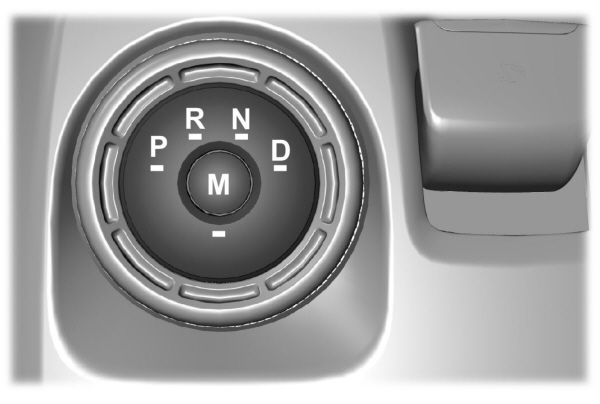
Understanding the Positions of Your Rotary Shift Transmission
P Park. R Reverse.N Neutral.D Drive.M Manual. |
Your vehicle has an electronic transmission shifter. The transmission selector is on the center console.
The instrument cluster displays the current drive range.
Park (P)
With the transmission in park (P), your vehicle locks the transmission and prevents the wheels from turning. Always come to a complete stop before putting your vehicle into and out of park (P).
When you switch the ignition off, your vehicle shifts into park (P). If you switch the ignition off when the vehicle is moving, the transmission first shifts into neutral (N) until it reaches approximately
3 mph (5 km/h) or slower, then shifts into park (P).
The electric parking brake may apply when you shift to park (P) without the brake pedal fully pressed. The electric parking brake applies when you shift to park (P) on large slopes. The electric parking brake releases with the drive away release function, or if you manually release it. See
Electric Parking Brake.
Note:
A warning tone sounds if you open the driver door and you have not shifted the transmission selector to park (P).
Automatic Return to Park
Your vehicle has a feature that shifts into park (P) when any of the following conditions occur and your vehicle is stationary:- You switch the vehicle off.
- You open the driver door with your seatbelt unlatched.
- You unlatch the driver seatbelt when the driver door is open.
If you turn your vehicle off when moving, your vehicle first shifts into neutral (N) until it slows down enough to shift into park (P) automatically.
Note:
This feature does not operate when your vehicle is in Stay in Neutral mode.
Note:
This feature may not work properly if the door ajar switch is malfunctioning. If your door ajar indicator does not illuminate when you open the driver door, the indicator illuminates with the driver door closed or a Transmission not in Park cluster message appears with the transmission in gear and the driver door closed, have your vehicle checked as soon as possible.
Note:
If you have waited an extended period of time, 2-15 minutes before starting your vehicle, unlatching your seatbelt can cause this feature to activate, even with the driver door closed.
Reverse (R)
|
WARNING:
Move the transmission selector lever to reverse (R) only when your vehicle is stationary and the engine is at idle speed. |
With the transmission selector in reverse (R), your vehicle moves backward. Always come to a complete stop before shifting into and out of reverse (R).
Neutral (N)
|
WARNING:
In neutral (N) your vehicle has the ability to roll freely. If you intend to leave your vehicle, make sure you apply the parking brake. |
With the transmission selector in neutral (N), you can start your vehicle and it is free to roll. Hold the brake pedal down when in this position.
Stay in Neutral Mode
Note:
Do not use Stay in Neutral Mode for towing as the transmission shifts to park (P) if the battery voltage becomes low.
Note:
Stay in Neutral Mode is a temporary vehicle state that works with the engine being in the running or OFF state. Extended usage of Stay in Neutral Mode when the engine is OFF may result in a battery voltage reduction to the level where the vehicle may no longer start. Overuse of this feature could result in vehicle damage not covered by the vehicle warranty.
When in Stay in Neutral Mode, you can start your vehicle and it is free to roll.
To enter Stay in Neutral Mode, do the following:
- Bring your vehicle to a complete stop.
- Shift into neutral (N).
- Press the manual (M) button within five seconds after shifting to neutral (N).
Note:
A Stay in Neutral Mode confirmation message appears in the information display when your vehicle has entered Stay in Neutral Mode and the neutral (N) button on the transmission selector slowly blinks.
To exit Stay in Neutral Mode, press the brake pedal and shift to park (P) or start the engine and apply brakes to shift to another gear, for example drive (D) or reverse (R).
Drive (D)
Drive (D) is the normal driving position for the best fuel economy and smoothness. Shift the transmission selector to drive (D) to allow your vehicle to move forward and shift automatically through the forward gears.
The transmission shifts to the appropriate gear for optimum performance based on ambient temperature, road slope, vehicle load and your input.
Manual (M)
To select manual (M), place the transmission selector in drive (D) and press the M button in the middle of the selector.
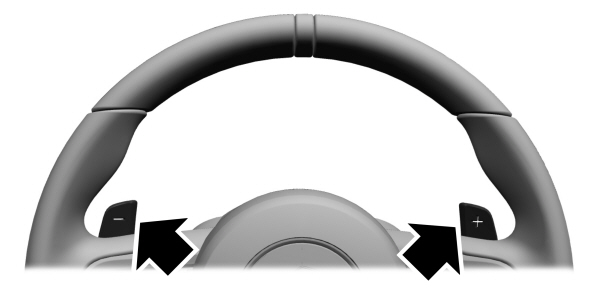
With the transmission selector in manual (M), the driver can change gears up or down using the paddle shifters. After pressing the manual (M) button while the transmission is in drive (D), you now have control of selecting the gear you desire using the (+) and (-) paddle shifters to upshift and downshift.
To exit manual (M) and return to drive (D), press the M button again.
SelectShift™ Dual Clutch Transmission
This transmission gives you the ability to change gears up or down without a clutch, as desired.
SelectShift is operational in both drive (D), known as Live in Drive, and manual (M).
While you can start the vehicle in as low as
-22 °F (-30 °C), the transmission does not shift from park (P) until the transmission fluid temperatures warms up above
-4 °F (-20 °C).
If the transmission is overheating from extreme use, it can result in the following symptoms:
Clutch Over Temperature: This message indicates one or both clutches are overheating and may open to protect the system. This occurs when the clutch absorbs too much energy in the form of slip, due to a variety of reasons.
Some examples of what could cause this are:- Launch control at an RPM set speed higher than optimal for the current conditions. The best mitigation is to either lower the RPM set speed for launch control maneuvers, or by not holding the RPM set speed as long in preparation for launch control.
- Slow uphill driving with no throttle application, known as creeping, or using the throttle instead of the brake to prevent rolling back on an uphill grade. These maneuvers cause the clutches to be in a constant state of slip. The best mitigation is to use the brake when at a standstill, or find a safe place to stop and put the transmission in park (P) until you can achieve a faster uphill speed of approximately 10 mph (16 km/h).
- Avoid simultaneously depressing the brake and accelerator pedals when driving in slow speed conditions. For example, in stop and go traffic, parades or drag strip staging lanes. This adds unnecessary heat to the clutches. Use a stop and start driving method rather than an ultra-slow creep.
If the clutch opens for temperature mitigation, clutch capability restores automatically after a brief period of time. If drive capability does not restore, stop in a safe location and put the vehicle in park (P) while leaving the engine running. If drive capability still does not restore after running the engine while in park (P), shut the vehicle off to allow it to cool down. If transmission issues exist after shutting the vehicle off, have your vehicle checked as soon as possible.
Transmission Too Hot Press Brake: This message acts as a warning that the transmission fluid is beginning to overheat. When a yellow warning appears in the cluster, you may notice a decrease in performance as engine torque limits itself to help cool the transmission fluid. A red warning indicates maximum torque limitation. The best way to quickly cool the transmission fluid and restore full performance is non-aggressive driving at a constant speed between
40–70 mph (65–112 km/h) in the highest available gear.
SelectShift in Drive (D)
Provides a temporary manual mode for performing more demanding maneuvers where extra control of gear selection is beneficial. For example, when towing or passing another vehicle. This mode holds a selected gear for a temporary period of time depending on driver inputs like accelerator pedal travel and the steering wheel angle.
To prevent the engine from either running at too low an RPM which risks stalling, or at too high an RPM which risks engine damage, Live in Drive automatically downshifts and upshifts if the engine speed is approaching idle or redline and you have not shifted in time. Although Live in Drive makes some shifts for you, it still allows you to shift at any time if it determines that there is no risk of damage to the engine from lugging or over-revving.
- Pull and release the right paddle to (+) to upshift.
- Pull and release the left paddle (-) to downshift.
- Pull and hold both the right paddle (+) and the left paddle (-) to temporarily open the clutches. The transmission remains in neutral (N) until you release both paddles, or after 30 minutes pass. When the clutches are open, no engine power transmits to the wheels and the vehicle can roll freely unless you apply the brakes. When holding the throttle pedal fully depressed, the release of both paddle shifters simultaneously results in an aggressive launch of the vehicle. You can utilize this feature with traction control on or off. You can also use this feature with traction control off to initiate wheel spin. Then, you can apply the brake pedal to keep the car stationary.
- Pull and hold the right paddle (+) to exit Live in Drive and command the transmission to sequentially upshift to the maximum allowed gear.
- Pull and hold the left paddle (-) for the lowest allowable gear. This is only available in Normal and Sport drive modes.
Note:
Paddle icons appear next to current indicated gear when in Live in Drive.
Note:
When in Live in Drive and you quickly press the accelerator pedal all the way down, the transmission downshifts for maximum performance when in drive (D).
SelectShift in Manual (M)
- Provides a permanent manual gear selection where full control of gear selection is required. Manual does not automatically upshift even if the engine is approaching the RPM limit. You need to manually shift by pressing the (+) button.
- Pull and release the right paddle (+) to upshift.
- Pull and release the left paddle (-) to downshift.
- Pull and hold both the right paddle (+) and the left paddle (-) for a temporary neutral position. Neutral (N) remains until you release both paddles.
- Pull and hold the right paddle (+) to command the transmission to sequentially upshift to the maximum allowed gear.
- Pull and hold the left paddle (-) for the lowest allowable gear. This is only available in Normal and Sport drive modes.
Note:
Do not use the temporary neutral position if you plan to tow your vehicle. Use the manual park release procedure found later in this section.
Note:
When in Drag Strip mode, the transmission automatically upshifts at the maximum engine RPM.
Note:
Engine damage may occur if you maintain excessive engine revving without shifting.
To exit SelectShift when in manual (M), deselect manual by pressing the (M) on the gear selector.
The instrument cluster displays your currently selected gear. If you request a gear but it is not available due to vehicle conditions, the current gear flashes three times.
Manual Park Release
|
WARNING:
When doing this procedure, you need to take the transmission out of park (P) which means your vehicle can roll freely. To avoid unwanted vehicle movement, always fully apply the parking brake prior to doing this procedure. Use wheels chocks if appropriate.
WARNING:
If the parking brake is fully released, but the brake warning lamp remains illuminated, the brakes may not be working properly. Have your vehicle checked as soon as possible.
WARNING:
Do not drive your vehicle until you verify that the stoplamps are working. |
Use the manual park release to move your transmission from the park (P) position in the event of an electrical malfunction or emergency.
Activating the Manual Park Release Cable
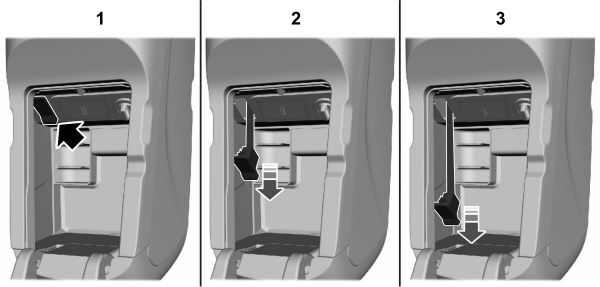
- Locate the manual park release cable access cover at the bottom of the center storage in the center console.
- Carefully open the access cover under the arm rest.
- Once in the driver seat, fully apply the brake pedal and hold. Do not release. Pull the loop on the strap until the detent locks in park override mode.
- Switch the ignition on, but do not start your vehicle. If done correctly, a message on the instrument cluster displays Park Not In Park or Shift System Fault.
Note:
Your vehicle is now out of park (P) position and is free to roll.
- With your foot fully applied on the brake pedal, disengage the parking brake. See Electric Parking Brake.
Note:
Switch off the ignition.This message might not display if the ignition is in the off state.
Returning Your Vehicle to Normal Mode
- Apply the parking brake.See Electric Parking Brake.
Note:
If the vehicle battery is dead, for example, no electrical power available, you may need an external power source to apply the parking brake.
- Fully apply the brake pedal and hold, do not release.
- Install the access cover.
- With your foot fully applied on the brake pedal, start your vehicle. Confirm that your vehicle is in the park (P) and that the instrument cluster indicates park (P).
- If the instrument cluster is not displaying the park (P) position or there is a message stating Park Not Available, apply the parking brake before exiting your vehicle.
- Confirm the manual park release cable is in the rest position. If the manual park release cable is in the rest position, and the instrument cluster is not displaying the park (P) position or there is a message stating Park Not Available, Transmission Not In Park or Shift System Fault, apply the parking brake before exiting your vehicle. Contact an authorized dealer for service.
Dual Clutch Transmission Adaptive Learning
This feature may increase durability and provide consistent shift feel over the life of your vehicle. A new vehicle or transmission may have firm shifts, soft shifts or both. This operation is normal and does not affect function or durability of the transmission. Over time, the adaptive learning process fully updates transmission operation.
If Your Vehicle Gets Stuck in Mud or Snow
If your vehicle gets stuck in mud or snow, you may rock it out by shifting between forward and reverse gears, stopping between shifts in a steady pattern. Press lightly on the accelerator in each gear.
Note:
Do not rock the vehicle if the engine is not at normal operating temperature or damage to the transmission could occur.
Note:
Do not rock the vehicle for more than a minute or damage to the transmission and tires could occur, or the engine could overheat.
- Please note that Ford will not respond to individual feedback.
- Please only provide detailed feedback regarding any inaccuracies in the content or any missing content in the Owner's Manual.
- Your feedback will be investigated, and any necessary changes will be updated in the online Owner's Manual.
- Please do not submit any vehicle related feedback. To submit feedback related to your vehicle, please click the link to find the correct contact information for your market.
Your input is valuable in helping us improve our Owner's Manual. Thank you for taking the time to provide your feedback.
North America
| Country | Phone | |
|---|---|---|
| United States | 1-800-392-3673 (FORD) | |
| Canada | 1-800-565-3673 (FORD) | |
| Mexico | 1-800-719-8466 | |
| Guam | 1-800-392-3673 (FORD) | |
| North Mariana Islands | apemcrc@ford.com | |
| Puerto Rico | (800) 841-3673 | prcac@ford.com |
| US Virgin Islands | (800) 841-3673 | prcac@ford.com |
IMG
| Country | Phone | |
|---|---|---|
| Algeria | nafcrc@ford.com | |
| Angola | ssacrc@ford.com | |
| Benin | ssacrc@ford.com | |
| Botswana | ssacrc@ford.com | |
| Burkina FASO | ssacrc@ford.com | |
| Burundi | ssacrc@ford.com | |
| Cameroon | ssacrc@ford.com | |
| Cape Verde | ssacrc@ford.com | |
| Central African Republic | ssacrc@ford.com | |
| Chad | ssacrc@ford.com | |
| Comoros | ssacrc@ford.com | |
| Dem Republic of Congo | ssacrc@ford.com | |
| Djibuti | ssacrc@ford.com | |
| Egypt | nafcrc@ford.com | |
| Equitorial Guinea | ssacrc@ford.com | |
| Eritrea | ssacrc@ford.com | |
| Ethiopia | ssacrc@ford.com | |
| Gabon | ssacrc@ford.com | |
| Gambia | ssacrc@ford.com | |
| Ghana | ssacrc@ford.com | |
| Guinea | ssacrc@ford.com | |
| Guinea-Bissau | ssacrc@ford.com | |
| Ivory Coast | ssacrc@ford.com | |
| Kenya | ssacrc@ford.com | |
| Liberia | ssacrc@ford.com | |
| Libya | nafcrc@ford.com | |
| Madagascar | ssacrc@ford.com | |
| Malawi | ssacrc@ford.com | |
| Mauritania | ssacrc@ford.com | |
| Mauritius | ssacrc@ford.com | |
| Morocco | nafcrc@ford.com | |
| Mozambique | ssacrc@ford.com | |
| Namibia | ssacrc@ford.com | |
| Niger | ssacrc@ford.com | |
| Nigeria | ssacrc@ford.com | |
| Republic of Congo | ssacrc@ford.com | |
| Rwanda | ssacrc@ford.com | |
| Sao Tome and Principe | ssacrc@ford.com | |
| Senegal | ssacrc@ford.com | |
| Sychelles | ssacrc@ford.com | |
| Sierra Leone | ssacrc@ford.com | |
| South Africa | 860011022 | fordcrc2@ford.com |
| South Sudan | ssacrc@ford.com | |
| Swaziland | ssacrc@ford.com | |
| Tanzania | ssacrc@ford.com | |
| Togo | ssacrc@ford.com | |
| Tunisia | nafcrc@ford.com | |
| Uganda | ssacrc@ford.com | |
| Zambia | ssacrc@ford.com | |
| Zimbabwe | ssacrc@ford.com | |
| American Somoa | apemcrc@ford.com | |
| Australia | (13 FORD) 13 3673 | foacust1@ford.com |
| Bangladesh | apemcrc@ford.com | |
| Bhutan | apemcrc@ford.com | |
| Brunei | apemcrc@ford.com | |
| Cambodia | apemcrc@ford.com | |
| Fiji | apemcrc@ford.com | |
| French Polynesia | apemcrc@ford.com | |
| India | apemcrc@ford.com | |
| Indonesia | apemcrc@ford.com | |
| Japan | apemcrc@ford.com | |
| Laos | apemcrc@ford.com | |
| Macao | apemcrc@ford.com | |
| Malaysia | apemcrc@ford.com | |
| Marshall Islands | apemcrc@ford.com | |
| Mongolia | apemcrc@ford.com | |
| Myanmar | apemcrc@ford.com | |
| Nepal | apemcrc@ford.com | |
| New Caledonia | apemcrc@ford.com | |
| New Zealand | 0800 367 369 (FORDNZ) | fnzcust@ford.com |
| Pakistan | apemcrc@ford.com | |
| Palau | apemcrc@ford.com | |
| Papua New Guinea | apemcrc@ford.com | |
| Philippines | 02-88669408 | emailus@ford.com |
| Singapore | apemcrc@ford.com | |
| South Korea | 82-2-1600-6003 | infokr1@ford.com |
| Sri Lanka | apemcrc@ford.com | |
| Tahiti | apemcrc@ford.com | |
| Thailand | 1383 | fordthai@ford.com |
| Timor Leste | apemcrc@ford.com | |
| Vanuatu | apemcrc@ford.com | |
| Vietnam | 1800588888 | fordvn@ford.com |
| Wallis and Futuna | apemcrc@ford.com | |
| Western Somoa | apemcrc@ford.com | |
| Afghanistan | menacac@ford.com | |
| Bahrain | menacac@ford.com | |
| Iraq | menacac@ford.com | |
| Israel | 08-9139995 | service1@kelekmotors.co.il |
| Jordan | menacac@ford.com | |
| Kuwait | 965 1 898900 | menacac@ford.com |
| Lebanon | menacac@ford.com | |
| Oman | menacac@ford.com | |
| Qatar | menacac@ford.com | |
| Saudi Arabia | 8008443673 | menacac@ford.com |
| Syria | menacac@ford.com | |
| United Arab Emirates | 80004441066 | menacac@ford.com |
| Yemen | menacac@ford.com |
Greater China
| Country | Phone | |
|---|---|---|
| China-Imported Vehicles | 400-690-1886 | |
| China-CAF | 951995 | |
| China-JMC | 400-003-1111 | |
| China-Lincoln | 400-988-6789 | |
| Taiwan | 0800-032100 | |
| Hong Kong | (852) 3768-4898 |
South America
| Country | Phone | |
|---|---|---|
| Argentina | 0800-888-3673 | |
| Bolivia | Contact Your Local Ford Distributor | |
| Brazil | 0800-703-3673 | central@ford.com |
| Chile | Contact Your Local Ford Distributor | |
| Colombia | Contact Your Local Ford Distributor | |
| Ecuador | Contact Your Local Ford Distributor | |
| French Guiana | Contact Your Local Ford Distributor | |
| Guyana | Contact Your Local Ford Distributor | |
| Paraguay | Contact Your Local Ford Distributor | |
| Peru | Contact Your Local Ford Distributor | |
| Suriname | Contact Your Local Ford Distributor | |
| Uruguay | Contact Your Local Ford Distributor | |
| Venezuela | Contact Your Local Ford Distributor |
Europe
| Country | Phone | |
|---|---|---|
| Albania | Contact Your Local Ford Distributor | |
| Andorra | Contact Your Local Ford Distributor | |
| Armenia | Contact Your Local Ford Distributor | |
| Austria | 01 20 609 2424 | kundenz@ford.com |
| Azerbaijan | Contact Your Local Ford Distributor | |
| Belarus | Contact Your Local Ford Distributor | |
| Belgium | 32 2 700 67 76 | custfobe@ford.com |
| Bosnia | Contact Your Local Ford Distributor | |
| Bulgaria | Contact Your Local Ford Distributor | |
| Croatia | Contact Your Local Ford Distributor | |
| Cyprus | Contact Your Local Ford Distributor | |
| Czech Republic | 800 3673 29 | zakaznik@ford.com |
| Denmark | 43 68 2000 | crcdk@ford.com |
| Estonia | 372 6710 060 | ford@infoauto.ee |
| Falkland Islands | Contact Your Local Ford Distributor | |
| Finland | 09 725 22022 | palvelut@ford.com |
| France | 0800 005 005 | crcfr@ford.com |
| Georgia | Contact Your Local Ford Distributor | |
| Germany | 0221 9999 2 999 | kunden@ford.com |
| Girbraltar | Contact Your Local Ford Distributor | |
| Greece | 216 900 88 99 | info11@ford.com |
| Hungary | +36 1 7777 555 | Contact Your Local Ford Distributor |
| Iceland | Contact Your Local Ford Distributor | |
| Ireland | 1800 771 199 | crcirela@ford.com |
| Italy | 800 22 44 33 | tu@ford.com |
| Kazakhstan | Contact Your Local Ford Distributor | |
| Latvia | +371 67303020 | |
| Liechtenstein | Contact Your Local Ford Distributor | |
| Lithuania | 370 5216 8226 | forduzklausos@inchcape.lt |
| Luxembourg | +352 248 71 800 | custfobe@ford.com |
| Macedonia | Contact Your Local Ford Distributor | |
| Malta | Contact Your Local Ford Distributor | |
| Moldova | Contact Your Local Ford Distributor | |
| Monaco | Contact Your Local Ford Distributor | |
| Montenegro | Contact Your Local Ford Distributor | |
| Netherlands | 70 7703 777 | klanten@ford.com |
| Norway | 47 66819739 | infonor@ford.com |
| Poland | 48 22 522 27 27 | kontakty@ford.com |
| Portugal | 800 210 373 | clientes@ford.com |
| Romania | 40 312298798 | crcro@ford.com |
| Russia | Contact Your Local Ford Distributor | |
| San Marino | Contact Your Local Ford Distributor | |
| Serbia | Contact Your Local Ford Distributor | |
| Serbia and Montenegro | Contact Your Local Ford Distributor | |
| Slovakia | Contact Your Local Ford Distributor | |
| Slovenia | Contact Your Local Ford Distributor | |
| South Georgia | Contact Your Local Ford Distributor | |
| Spain | 900 80 70 90 | crcspain@ford.com |
| Sweden | 08-593 66 333 | fordkund@ford.com |
| Switzerland | 044 511 14 45 | assistch@ford.com |
| Turkey | Contact Your Local Ford Distributor | |
| Ukraine | Contact Your Local Ford Distributor | |
| United Kingdom | 020 3564 4444 | UKCRC1@ford.com |
Caribbean and Central America
| Country | Phone | |
|---|---|---|
| Anguilla | (313) 594-4857 | expcac@ford.com |
| Antigua | (313) 594-4857 | expcac@ford.com |
| Aruba | (313) 594-4857 | expcac@ford.com |
| Bahamas | (313) 594-4857 | expcac@ford.com |
| Barbados | (313) 594-4857 | expcac@ford.com |
| Bermuda | (313) 594-4857 | expcac@ford.com |
| Bonaire and St. Eustatius | (313) 594-4857 | expcac@ford.com |
| Cayman Islands | (313) 594-4857 | expcac@ford.com |
| Curacao | (313) 594-4857 | expcac@ford.com |
| Dominica | (313) 594-4857 | expcac@ford.com |
| Dominican Republic | (313) 594-4857 | expcac@ford.com |
| Grenada | (313) 594-4857 | expcac@ford.com |
| Haiti | (313) 594-4857 | expcac@ford.com |
| Jamaica | (313) 594-4857 | expcac@ford.com |
| Martinique | (313) 594-4857 | expcac@ford.com |
| Montserrat | (313) 594-4857 | expcac@ford.com |
| St. Kitts and Nevis | (313) 594-4857 | expcac@ford.com |
| St. Lucia | (313) 594-4857 | expcac@ford.com |
| St. Martin | (313) 594-4857 | expcac@ford.com |
| St. Vincent and the Grenadines | (313) 594-4857 | expcac@ford.com |
| Trinidad and Tobago | (313) 594-4857 | expcac@ford.com |
| Turks and Caicos | (313) 594-4857 | expcac@ford.com |
| British Virgin Islands | (313) 594-4857 | expcac@ford.com |
| Netherlands Antilles | (313) 594-4857 | expcac@ford.com |
| Belize | (313) 594-4857 | expcac@ford.com |
| Costa Rica | (313) 594-4857 | expcac@ford.com |
| El Salvador | (313) 594-4857 | expcac@ford.com |
| Guatemala | (313) 594-4857 | expcac@ford.com |
| Honduras | (313) 594-4857 | expcac@ford.com |
| Nicaragua | (313) 594-4857 | expcac@ford.com |
| Panama | (313) 594-4857 | expcac@ford.com |