

The information contained in this publication was correct at the time of release.In the interest of continuous development, we reserve the right to change specifications, design or equipment at any time without notice or obligation.No part of this publication may be reproduced, transmitted, stored in a retrieval system or translated into any language in any form by any means without our written permission.Errors and omissions excepted.
Copyright © 2026 Ford Motor Company
Universal Garage Door Opener

HomeLink Wireless Control System
 WARNING:
Do not use the system with any garage door opener that does not have the safety stop and reverse feature as required by U.S. Federal Safety Standards (this includes any garage door opener manufactured before April 1, 1982). A garage door opener which cannot detect an object, signaling the door to stop and reverse, does not meet current federal safety standards. Using a garage door opener without these features increases the risk of serious injury or death. |
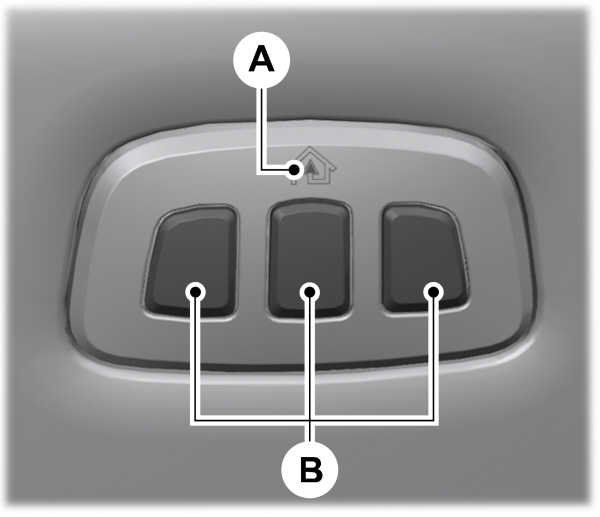
The universal garage door opener replaces the handheld garage door opener with a three-button transmitter integrated into the driver side sun visor.
A Homelink indicator B Homelink function buttons |
The system offers two main features, a garage door opener and a platform for remote activation of devices within the home, including entry gate operators, security systems, entry door locks, and home or office lighting. You can program up to three devices.
To change or replace any of the three programmed buttons, you must either clear all codes or reprogram the individual button. Use the clear function to erase all codes, or the reprogram function to update an individual button.
| Clearing Stored Codes | Reprogramming Individual Buttons |
|---|---|
| To clear all stored codes. | Override a programmed button. |
|
|
We recommend that upon the sale or lease termination of your vehicle, you erase the programmed function buttons for security reasons.
Additional assistance can be found online at https://www.homelink.com/Ford by scanning the code below or by calling the toll-free help line at 1-800-355-3515.
Programming the Garage Door Opener
Canadian radio frequency laws require transmitter signals to time out, or quit, after several seconds, which may not be long enough for HomeLink to pick up the signal. U.S. gate operators time out in the same manner. For these transmitters, use the Programming the Garage Door Opener to your Gate Opener Motor information.
Before programming:- Put a new or unused battery in the handheld transmitter. This allows for quicker training and accurate transmission of the radio frequency signal. Using an old battery may result in the Homelink producing a weak signal.
- Make sure that the garage door and security device are free from obstruction when you are programming. Do not program the universal garage door opener with the vehicle in the garage.
Homelink Indicator Status
| Indicator Status | Details |
|---|---|
| Slow Flash | The transmitter is searching for a program code. |
| Solid or Continuous Light | The transmitter is programmed to a fixed code. |
| Rapid Flash | The transmitter is programmed to a rolling code and may need additional programming. |
Programming the Garage Door Opener to your Handheld Transmitter
The programming steps below assume you are programming a HomeLink that was not previously programmed. If your HomeLink was previously programmed, you may need to clear or reprogram your HomeLink buttons.
To program your in-vehicle HomeLink function button with your handheld transmitter:
- With your vehicle parked outside the garage, switch the ignition on, but do not start the engine.
- Press and release the HomeLink function button you want to program. The indicator begins to flash. If the indicator does not flash, press and hold the function button for 20 seconds until the indicator begins to flash.
- Hold your handheld transmitter 1–3 in (2–8 cm) away from the HomeLink function button you are programming.
- Press and hold the handheld transmitter button while watching the HomeLink indicator. Continue to hold the handheld button until the HomeLink indicator flashes rapidly or is continuously on.
Note:
You may need to use a different method if you live in Canada or have difficulties programming your gate operator or garage door opener.
- Press and hold the programmed HomeLink button for two seconds, then release. You may need to repeat this step to activate the door. If the HomeLink indicator stays on, the programming is complete. If the HomeLink indicator flashes rapidly, the transmitter is programmed to a rolling code system; repeat this step. If your device still does not operate you must program your garage door opener to your garage door opener motor.
- To program additional buttons, repeat Steps 1–4.
Keep your handheld transmitter for future programming or use in other vehicles.
Programming the Garage Door Opener to your Garage Door Opener Motor
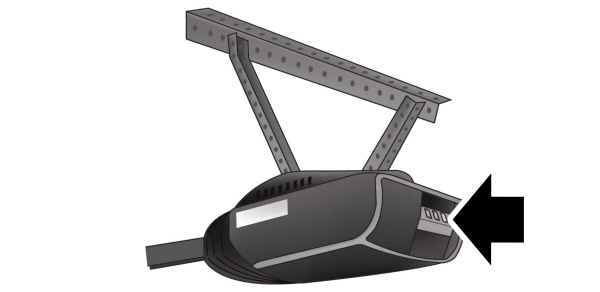
- Press the Learn button on the garage door opener motor. You have 30 seconds to complete the next two steps.
- Return to your vehicle.
- Press and hold the HomeLink function button you want to program for two seconds, then release.
- Repeat Step 3. Depending on your brand of garage door opener, you may need to repeat this sequence a third time.
Programming the Garage Door Opener to your Gate Opener Motor
Gate Operator / Canadian Programming
Canadian radio frequency laws require transmitter signals to time out (or quit) after several seconds of transmission, which may not be long enough for HomeLink to pick up the signal during programming. Similar to this Canadian law, some U.S. gate operators are designed to time out in the same manner.
If programming a garage door opener or gate operator, unplug the device during the cycling process to prevent possible overheating.
- Press and release your handheld transmitter, every two seconds, until the HomeLink indicator flashes rapidly or is continuously on.
- Release the handheld transmitter button.
- Press and hold the HomeLink function button you want to program for two seconds, then release. You may need to repeat this step to activate the door. If the HomeLink indicator stays on, the programming is complete. If the HomeLink indicator flashes rapidly, the transmitter is programmed to a rolling code system, repeat Step 3.
- To program additional buttons, repeat Steps 1–4.
Additional assistance can be found online at https://www.homelink.com/Ford or by calling the toll-free help line at 1-800-355-3515.
FCC and RSS-210 Industry Canada Compliance
|
WARNING:
Changes or modifications not expressively approved by the party responsible for compliance could void the user's authority to operate the equipment. The term "IC:" before the radio certification number only signifies that Industry Canada technical specifications were met. |
This device complies with Part 15 of the FCC Rules and with RSS-210 of Industry Canada. Operation is subject to the following two conditions: (1) this device may not cause harmful interference, and (2) this device must accept any interference received, including interference that may cause undesired operation.
This equipment complies with FCC radiation exposure limits set forth for an uncontrolled environment. End Users must follow the specific operating instructions for satisfying RF exposure compliance. This transmitter must be at least 8 in (20 cm) from the user and must not be co-located or operating in conjunction with any other antenna or transmitter.
- Please note that Ford will not respond to individual feedback.
- Please only provide detailed feedback regarding any inaccuracies in the content or any missing content in the Owner's Manual.
- Your feedback will be investigated, and any necessary changes will be updated in the online Owner's Manual.
- Please do not submit any vehicle related feedback. To submit feedback related to your vehicle, please click the link to find the correct contact information for your market.
Your input is valuable in helping us improve our Owner's Manual. Thank you for taking the time to provide your feedback.
North America
| Country | Phone | |
|---|---|---|
| United States | 1-800-392-3673 (FORD) | |
| Canada | 1-800-565-3673 (FORD) | |
| Mexico | 1-800-719-8466 | |
| Guam | 1-800-392-3673 (FORD) | |
| North Mariana Islands | apemcrc@ford.com | |
| Puerto Rico | (800) 841-3673 | prcac@ford.com |
| US Virgin Islands | (800) 841-3673 | prcac@ford.com |
IMG
| Country | Phone | |
|---|---|---|
| Algeria | nafcrc@ford.com | |
| Angola | ssacrc@ford.com | |
| Benin | ssacrc@ford.com | |
| Botswana | ssacrc@ford.com | |
| Burkina FASO | ssacrc@ford.com | |
| Burundi | ssacrc@ford.com | |
| Cameroon | ssacrc@ford.com | |
| Cape Verde | ssacrc@ford.com | |
| Central African Republic | ssacrc@ford.com | |
| Chad | ssacrc@ford.com | |
| Comoros | ssacrc@ford.com | |
| Dem Republic of Congo | ssacrc@ford.com | |
| Djibuti | ssacrc@ford.com | |
| Egypt | nafcrc@ford.com | |
| Equitorial Guinea | ssacrc@ford.com | |
| Eritrea | ssacrc@ford.com | |
| Ethiopia | ssacrc@ford.com | |
| Gabon | ssacrc@ford.com | |
| Gambia | ssacrc@ford.com | |
| Ghana | ssacrc@ford.com | |
| Guinea | ssacrc@ford.com | |
| Guinea-Bissau | ssacrc@ford.com | |
| Ivory Coast | ssacrc@ford.com | |
| Kenya | ssacrc@ford.com | |
| Liberia | ssacrc@ford.com | |
| Libya | nafcrc@ford.com | |
| Madagascar | ssacrc@ford.com | |
| Malawi | ssacrc@ford.com | |
| Mauritania | ssacrc@ford.com | |
| Mauritius | ssacrc@ford.com | |
| Morocco | nafcrc@ford.com | |
| Mozambique | ssacrc@ford.com | |
| Namibia | ssacrc@ford.com | |
| Niger | ssacrc@ford.com | |
| Nigeria | ssacrc@ford.com | |
| Republic of Congo | ssacrc@ford.com | |
| Rwanda | ssacrc@ford.com | |
| Sao Tome and Principe | ssacrc@ford.com | |
| Senegal | ssacrc@ford.com | |
| Sychelles | ssacrc@ford.com | |
| Sierra Leone | ssacrc@ford.com | |
| South Africa | 860011022 | fordcrc2@ford.com |
| South Sudan | ssacrc@ford.com | |
| Swaziland | ssacrc@ford.com | |
| Tanzania | ssacrc@ford.com | |
| Togo | ssacrc@ford.com | |
| Tunisia | nafcrc@ford.com | |
| Uganda | ssacrc@ford.com | |
| Zambia | ssacrc@ford.com | |
| Zimbabwe | ssacrc@ford.com | |
| American Somoa | apemcrc@ford.com | |
| Australia | (13 FORD) 13 3673 | foacust1@ford.com |
| Bangladesh | apemcrc@ford.com | |
| Bhutan | apemcrc@ford.com | |
| Brunei | apemcrc@ford.com | |
| Cambodia | apemcrc@ford.com | |
| Fiji | apemcrc@ford.com | |
| French Polynesia | apemcrc@ford.com | |
| India | apemcrc@ford.com | |
| Indonesia | apemcrc@ford.com | |
| Japan | apemcrc@ford.com | |
| Laos | apemcrc@ford.com | |
| Macao | apemcrc@ford.com | |
| Malaysia | apemcrc@ford.com | |
| Marshall Islands | apemcrc@ford.com | |
| Mongolia | apemcrc@ford.com | |
| Myanmar | apemcrc@ford.com | |
| Nepal | apemcrc@ford.com | |
| New Caledonia | apemcrc@ford.com | |
| New Zealand | 0800 367 369 (FORDNZ) | fnzcust@ford.com |
| Pakistan | apemcrc@ford.com | |
| Palau | apemcrc@ford.com | |
| Papua New Guinea | apemcrc@ford.com | |
| Philippines | 02-88669408 | emailus@ford.com |
| Singapore | apemcrc@ford.com | |
| South Korea | 82-2-1600-6003 | infokr1@ford.com |
| Sri Lanka | apemcrc@ford.com | |
| Tahiti | apemcrc@ford.com | |
| Thailand | 1383 | fordthai@ford.com |
| Timor Leste | apemcrc@ford.com | |
| Vanuatu | apemcrc@ford.com | |
| Vietnam | 1800588888 | fordvn@ford.com |
| Wallis and Futuna | apemcrc@ford.com | |
| Western Somoa | apemcrc@ford.com | |
| Afghanistan | menacac@ford.com | |
| Bahrain | menacac@ford.com | |
| Iraq | menacac@ford.com | |
| Israel | 08-9139995 | service1@kelekmotors.co.il |
| Jordan | menacac@ford.com | |
| Kuwait | 965 1 898900 | menacac@ford.com |
| Lebanon | menacac@ford.com | |
| Oman | menacac@ford.com | |
| Qatar | menacac@ford.com | |
| Saudi Arabia | 8008443673 | menacac@ford.com |
| Syria | menacac@ford.com | |
| United Arab Emirates | 80004441066 | menacac@ford.com |
| Yemen | menacac@ford.com |
Greater China
| Country | Phone | |
|---|---|---|
| China-Imported Vehicles | 400-690-1886 | |
| China-CAF | 951995 | |
| China-JMC | 400-003-1111 | |
| China-Lincoln | 400-988-6789 | |
| Taiwan | 0800-032100 | |
| Hong Kong | (852) 3768-4898 |
South America
| Country | Phone | |
|---|---|---|
| Argentina | 0800-888-3673 | |
| Bolivia | Contact Your Local Ford Distributor | |
| Brazil | 0800-703-3673 | central@ford.com |
| Chile | Contact Your Local Ford Distributor | |
| Colombia | Contact Your Local Ford Distributor | |
| Ecuador | Contact Your Local Ford Distributor | |
| French Guiana | Contact Your Local Ford Distributor | |
| Guyana | Contact Your Local Ford Distributor | |
| Paraguay | Contact Your Local Ford Distributor | |
| Peru | Contact Your Local Ford Distributor | |
| Suriname | Contact Your Local Ford Distributor | |
| Uruguay | Contact Your Local Ford Distributor | |
| Venezuela | Contact Your Local Ford Distributor |
Europe
| Country | Phone | |
|---|---|---|
| Albania | Contact Your Local Ford Distributor | |
| Andorra | Contact Your Local Ford Distributor | |
| Armenia | Contact Your Local Ford Distributor | |
| Austria | 01 20 609 2424 | kundenz@ford.com |
| Azerbaijan | Contact Your Local Ford Distributor | |
| Belarus | Contact Your Local Ford Distributor | |
| Belgium | 32 2 700 67 76 | custfobe@ford.com |
| Bosnia | Contact Your Local Ford Distributor | |
| Bulgaria | Contact Your Local Ford Distributor | |
| Croatia | Contact Your Local Ford Distributor | |
| Cyprus | Contact Your Local Ford Distributor | |
| Czech Republic | 800 3673 29 | zakaznik@ford.com |
| Denmark | 43 68 2000 | crcdk@ford.com |
| Estonia | 372 6710 060 | ford@infoauto.ee |
| Falkland Islands | Contact Your Local Ford Distributor | |
| Finland | 09 725 22022 | palvelut@ford.com |
| France | 0800 005 005 | crcfr@ford.com |
| Georgia | Contact Your Local Ford Distributor | |
| Germany | 0221 9999 2 999 | kunden@ford.com |
| Girbraltar | Contact Your Local Ford Distributor | |
| Greece | 216 900 88 99 | info11@ford.com |
| Hungary | +36 1 7777 555 | Contact Your Local Ford Distributor |
| Iceland | Contact Your Local Ford Distributor | |
| Ireland | 1800 771 199 | crcirela@ford.com |
| Italy | 800 22 44 33 | tu@ford.com |
| Kazakhstan | Contact Your Local Ford Distributor | |
| Latvia | +371 67303020 | |
| Liechtenstein | Contact Your Local Ford Distributor | |
| Lithuania | 370 5216 8226 | forduzklausos@inchcape.lt |
| Luxembourg | +352 248 71 800 | custfobe@ford.com |
| Macedonia | Contact Your Local Ford Distributor | |
| Malta | Contact Your Local Ford Distributor | |
| Moldova | Contact Your Local Ford Distributor | |
| Monaco | Contact Your Local Ford Distributor | |
| Montenegro | Contact Your Local Ford Distributor | |
| Netherlands | 70 7703 777 | klanten@ford.com |
| Norway | 47 66819739 | infonor@ford.com |
| Poland | 48 22 522 27 27 | kontakty@ford.com |
| Portugal | 800 210 373 | clientes@ford.com |
| Romania | 40 312298798 | crcro@ford.com |
| Russia | Contact Your Local Ford Distributor | |
| San Marino | Contact Your Local Ford Distributor | |
| Serbia | Contact Your Local Ford Distributor | |
| Serbia and Montenegro | Contact Your Local Ford Distributor | |
| Slovakia | Contact Your Local Ford Distributor | |
| Slovenia | Contact Your Local Ford Distributor | |
| South Georgia | Contact Your Local Ford Distributor | |
| Spain | 900 80 70 90 | crcspain@ford.com |
| Sweden | 08-593 66 333 | fordkund@ford.com |
| Switzerland | 044 511 14 45 | assistch@ford.com |
| Turkey | Contact Your Local Ford Distributor | |
| Ukraine | Contact Your Local Ford Distributor | |
| United Kingdom | 020 3564 4444 | UKCRC1@ford.com |
Caribbean and Central America
| Country | Phone | |
|---|---|---|
| Anguilla | (313) 594-4857 | expcac@ford.com |
| Antigua | (313) 594-4857 | expcac@ford.com |
| Aruba | (313) 594-4857 | expcac@ford.com |
| Bahamas | (313) 594-4857 | expcac@ford.com |
| Barbados | (313) 594-4857 | expcac@ford.com |
| Bermuda | (313) 594-4857 | expcac@ford.com |
| Bonaire and St. Eustatius | (313) 594-4857 | expcac@ford.com |
| Cayman Islands | (313) 594-4857 | expcac@ford.com |
| Curacao | (313) 594-4857 | expcac@ford.com |
| Dominica | (313) 594-4857 | expcac@ford.com |
| Dominican Republic | (313) 594-4857 | expcac@ford.com |
| Grenada | (313) 594-4857 | expcac@ford.com |
| Haiti | (313) 594-4857 | expcac@ford.com |
| Jamaica | (313) 594-4857 | expcac@ford.com |
| Martinique | (313) 594-4857 | expcac@ford.com |
| Montserrat | (313) 594-4857 | expcac@ford.com |
| St. Kitts and Nevis | (313) 594-4857 | expcac@ford.com |
| St. Lucia | (313) 594-4857 | expcac@ford.com |
| St. Martin | (313) 594-4857 | expcac@ford.com |
| St. Vincent and the Grenadines | (313) 594-4857 | expcac@ford.com |
| Trinidad and Tobago | (313) 594-4857 | expcac@ford.com |
| Turks and Caicos | (313) 594-4857 | expcac@ford.com |
| British Virgin Islands | (313) 594-4857 | expcac@ford.com |
| Netherlands Antilles | (313) 594-4857 | expcac@ford.com |
| Belize | (313) 594-4857 | expcac@ford.com |
| Costa Rica | (313) 594-4857 | expcac@ford.com |
| El Salvador | (313) 594-4857 | expcac@ford.com |
| Guatemala | (313) 594-4857 | expcac@ford.com |
| Honduras | (313) 594-4857 | expcac@ford.com |
| Nicaragua | (313) 594-4857 | expcac@ford.com |
| Panama | (313) 594-4857 | expcac@ford.com |