
This view of the Owner's Manual contains the very latest information, which may vary slightly from the printed Owner's Manual originally provided with your vehicle. It may also describe content that is not on or operates differently on your vehicle. Please consider the Owner's Manual originally provided with your vehicle as the primary source of information for your vehicle.

The information contained in this publication was correct at the time of release.In the interest of continuous development, we reserve the right to change specifications, design or equipment at any time without notice or obligation.No part of this publication may be reproduced, transmitted, stored in a retrieval system or translated into any language in any form by any means without our written permission.Errors and omissions excepted.
Copyright © 2026 Ford Motor Company
Keyless Entry
The system will not function if: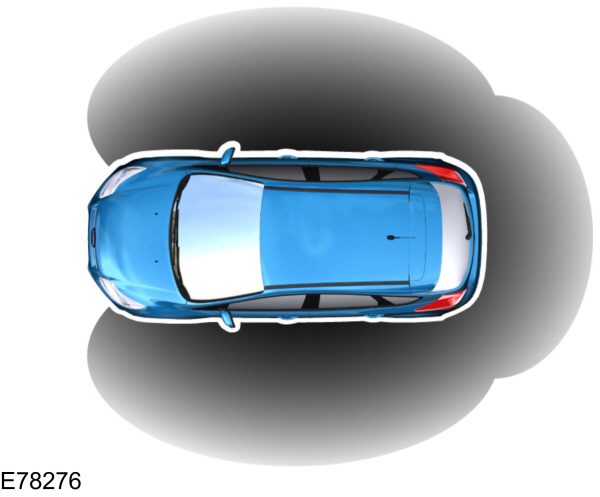
General Information
 WARNING:
The system may not function if the key is close to metal objects or electronic devices such as cell phones. |
The system will not function if:
- Your vehicle battery has no charge.
- The passive key frequencies are jammed.
- The passive key battery is flat.
Note:
If the system does not function, you will need to use the key blade to lock and unlock your vehicle.
The system allows you to operate your vehicle without the use of a key or remote control.
Passive locking and unlocking requires a valid passive key to be located within one of the three external detection ranges. These are located approximately five feet (one and a half meters) from the front door handles and the liftgate.
Passive Key
Your vehicle can be locked and unlocked with the passive key. You can use the passive key as a remote control. See
Locking and Unlocking.
Locking Your Vehicle
|
WARNING:
Your vehicle does not lock itself automatically. If you do not press a locking button your vehicle will remain unlocked. |
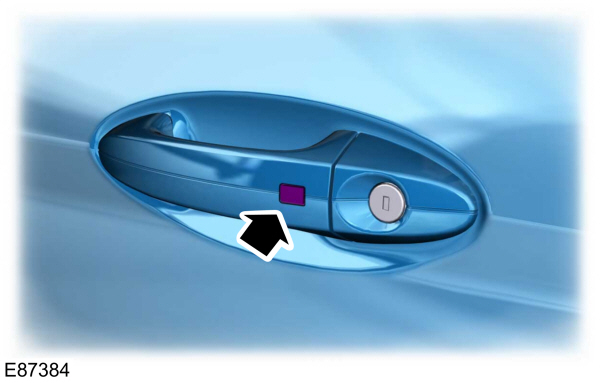
Locking buttons are located on each of the front doors.
For central locking and to arm the alarm, press a locking button once.
For double locking and to arm the alarm, press a locking button twice within three seconds.
There is a brief delay before you can unlock your vehicle again. This delay lets you pull the handle to make sure your vehicle is locked. When the delay period is over, you can unlock the doors again, provided the passive key is within the respective detection range.
Liftgate
Note:
The liftgate cannot be closed and will pop back up if the passive key is located inside the luggage compartment with the doors locked.
Note:
If a second valid passive key is located within the liftgate detection range, the liftgate can be closed.
Unlocking Your Vehicle
Note:
When your vehicle remains locked for longer than three days, the system will enter an energy-saving mode. This is to prevent your vehicle battery running out of charge. When your vehicle is unlocked while in this mode, the reaction time of the system may be a little longer than normal. To exit the energy-saving mode, unlock your vehicle.
Press a locking button once.
Note:
A valid passive key must be located within the detection range of that door.
One long flash of the direction indicators confirms that all the doors and the liftgate have been unlocked and that the alarm has been disarmed.
Unlocking Only the Driver's Door
If the unlocking function is reprogrammed so that only the driver’s door and the liftgate are unlocked. See
Remote Control.
Note the following:
If the driver’s door is the first door which is opened, the other doors will remain locked. All the other doors can be unlocked from inside your vehicle by pressing the unlock button on the instrument panel. For item location: See
At a Glance.
Disabled Keys
Any keys left inside your vehicle interior when it is locked will be disabled.
You cannot use a disabled key to switch the ignition on or start the engine.
You must enable all passive keys again in order to use them.
To enable all your passive keys, unlock your vehicle using a passive key or the remote control unlocking function.
All passive keys will then be enabled if you switch the ignition on or you start your vehicle with a valid key.
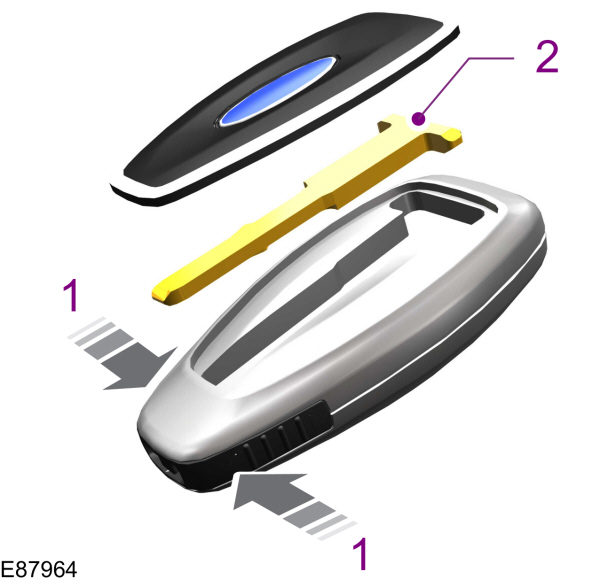
Locking and Unlocking the Doors With the Key Blade
- Carefully remove the cover.
- Remove the key blade and insert it into the lock.
Note:
Only the driver's door handle has a lock cylinder.