
This view of the Owner's Manual contains the very latest information, which may vary slightly from the printed Owner's Manual originally provided with your vehicle. It may also describe content that is not on or operates differently on your vehicle. Please consider the Owner's Manual originally provided with your vehicle as the primary source of information for your vehicle.

The information contained in this publication was correct at the time of release.In the interest of continuous development, we reserve the right to change specifications, design or equipment at any time without notice or obligation.No part of this publication may be reproduced, transmitted, stored in a retrieval system or translated into any language in any form by any means without our written permission.Errors and omissions excepted.
Copyright © 2026 Ford Motor Company
Using Cruise Control
 WARNING:
Do not use cruise control on winding roads, in heavy traffic or when the road surface is slippery. This could result in loss of vehicle control, serious injury or death.
WARNING:
When you are going downhill, your vehicle speed could increase above the set speed. The system does not apply the brakes. |
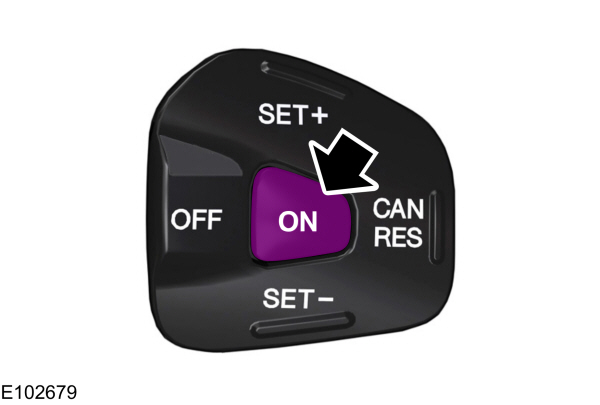
The cruise controls are on the steering wheel.
Note:
Cruise control will disengage if your vehicle speed decreases more than
10 mph (16 km/h) below your set speed while driving uphill.
Switching Cruise Control On
Press and release ON.
Setting the Cruise Speed
- Drive to desired speed.
- Press and release SET+.
- Take your foot off the accelerator pedal.
 The indicator displays in the instrument cluster. |
Changing the Set Speed
- Press and release SET+ or SET- to change the set speed in small increments.
- Press the accelerator or brake pedal until you reach the desired speed. Press and release SET+.
- Press and hold SET+ or SET-. Release the control when you reach the desired speed.
Canceling the Set Speed
Press and release CAN, or tap the brake pedal. The indicator no longer displays in the instrument cluster. The set speed will not be erased.
Note:
For vehicles with manual transmission, depressing the clutch pedal will also cancel the set speed.
Resuming the Set Speed
Press and release RES. The indicator displays in the instrument cluster.
Switching Cruise Control Off
Press and release OFF when the system is in stand by mode or switch the ignition off.
Note:
You erase the set speed when you switch the system off.