
This view of the Owner's Manual contains the very latest information, which may vary slightly from the printed Owner's Manual originally provided with your vehicle. It may also describe content that is not on or operates differently on your vehicle. Please consider the Owner's Manual originally provided with your vehicle as the primary source of information for your vehicle.

The information contained in this publication was correct at the time of release.In the interest of continuous development, we reserve the right to change specifications, design or equipment at any time without notice or obligation.No part of this publication may be reproduced, transmitted, stored in a retrieval system or translated into any language in any form by any means without our written permission.Errors and omissions excepted.
Copyright © 2026 Ford Motor Company
Pre-Collision Assist


 WARNING:
You are responsible for controlling your vehicle at all times. The system is designed to be an aid and does not relieve you of your responsibility to drive with due care and attention. Failure to follow this instruction could result in the loss of control of your vehicle, personal injury or death.
WARNING:
The system does not detect vehicles that are driving in a different direction, cyclists or animals. Apply the brakes when necessary. Failure to follow this instruction could result in the loss of control of your vehicle, personal injury or death.
WARNING:
The system does not operate during hard acceleration or steering. Failure to take care may lead to a crash or personal injury.
WARNING:
The system may fail or operate with reduced function during cold and severe weather conditions. Snow, ice, rain, spray and fog can adversely affect the system. Keep the front camera and radar free of snow and ice. Failure to take care may result in the loss of control of your vehicle, serious personal injury or death.
WARNING:
In situations where the vehicle camera has limited detection capability, this may reduce system performance. These situations include but are not limited to direct or low sunlight, vehicles at night without tail lights, unconventional vehicle types, pedestrians with complex backgrounds, running pedestrians, partly obscured pedestrians, or pedestrians that the system cannot distinguish from a group. Failure to take care may result in the loss of control of your vehicle, serious personal injury or death.
WARNING:
The system cannot help prevent all crashes. Do not rely on this system to replace driver judgment and the need to maintain a safe distance and speed. |
Using the Pre-Collision Assist System
The system is active at speeds above approximately3 mph (5 km/h)and pedestrian detection is active at speeds up to
50 mph (80 km/h).
If your vehicle is rapidly approaching another stationary vehicle, a vehicle traveling in the same direction as yours, or a pedestrian within your driving path, the system is designed to provide three levels of functionality:
- Alert.
- Brake Support.
- Active Braking.
Alert: When active, a flashing visual warning appears and an audible warning tone sounds.
Brake Support: The system is designed to help reduce the impact speed by preparing the brakes for rapid braking. Brake support does not automatically apply the brakes. If you press the brake pedal, the system could apply additional braking up to maximum braking force, even if you lightly press the brake pedal.
Active Braking: Active braking may activate if the system determines that a collision is imminent. The system may help the driver reduce impact damage or avoid the crash completely.
Note:
Brake support and active braking are active at speeds up to
75 mph (120 km/h). If your vehicle has a radar sensor included with adaptive cruise control, then brake support and active braking are active up to the maximum speed of the vehicle.
Note:
If you perceive the pre-collision assist alert as being too frequent or disturbing, you can reduce the alert sensitivity. The low sensitivity causes fewer and later warnings of a potential forward collision. The manufacturer recommends using the high sensitivity setting where possible.
Note:
The sensitivity setting does not affect the performance of the automatic emergency braking.
Note:
The system turns off when you select deep conditions or deep sand mode.
Distance Indication and Alert (If Equipped)
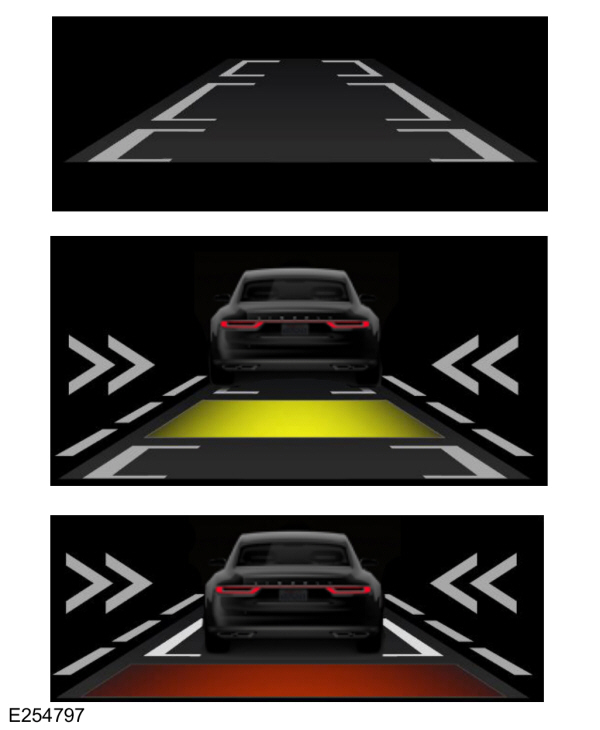
This is a function that provides the driver with a graphical indication of the time gap to other preceding vehicles traveling in the same direction. The system shows one of the graphics that follow in the information display.
If the time gap to a preceding vehicle is small, a red visual indication displays to the driver.
Note:
The system turns off and the graphics do not display when adaptive cruise control is active.
| Speed | Sensitivity | Graphics | Distance Gap | Time Gap |
|---|---|---|---|---|
| 62 mph (100 km/h) | Normal | Grey | >82 ft (25 m) | >0.9sec |
| 62 mph (100 km/h) | Normal | Yellow | 56–82 ft (17–25 m) | 0.6sec — 0.9sec |
| 62 mph (100 km/h) | Normal | Red | <56 ft (17 m) | <0.6sec |
Evasive Steering Assist (If Equipped)
If your vehicle is rapidly approaching a road user, this helps you steer around the road user.
After you turn the steering wheel in an attempt to avoid a crash with the road user, the system applies additional steering torque to help you steer around the road user. After you pass the road user, the system applies steering torque when you turn the steering wheel to steer back into the lane. The system turns off after you fully pass the road user.
Note:
Road users are defined as another stationary vehicle in the same lane or a vehicle traveling in the same lane in the same direction as you.
Evasive steering assist only activates when all the following occur:- Automatic emergency braking and evasive steering assist are on.
- The system detects a road user ahead and starts to apply the brakes.
- You significantly turn the steering wheel to steer around a road user.
Note:
The system does not automatically steer around a road user. If you do not turn the steering wheel, the system does not activate.
Note:
The system does not activate if the distance to the road user ahead is too small and the system cannot avoid a crash.
Note:
The system does not activate with cyclists or pedestrians.
Adjusting the Pre-Collision Assist Settings
You can adjust the following settings by using the touchscreen.- You can change alert and distance alert sensitivity to one of three possible settings.
- You can switch distance indication and alert on or off.
- If required, you can switch active braking on or off.
- If required, you can switch evasive steering assist on or off.
Note:
Active braking and evasive steering assist automatically turn on every time you switch the ignition on.
Note:
If you switch active braking off, evasive steering assist turns off.
Blocked Sensors
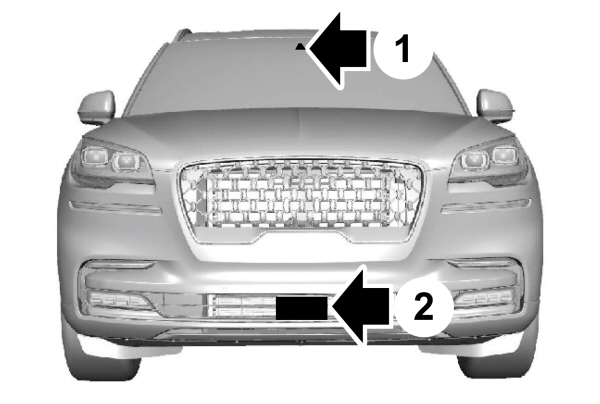
1 Camera. 2 Radar sensor (if equipped). |
If a message regarding a blocked sensor or camera appears in the information display, the radar signals or camera images are obstructed. If your vehicle has a radar sensor, it is behind the fascia cover in the center of the lower grille. With a blocked sensor or camera, the system may not function, or performance may reduce. The following table lists possible causes and actions for when this message displays.
Camera Troubleshooting
| Cause | Action |
|---|---|
| The windshield in front of the camera is dirty or obstructed in some way. | Clean the outside of the windshield in front of the camera. |
| The windshield in front of the camera is clean but the message remains in the display screen. | Wait a short time. It may take several minutes for the camera to detect that there is no obstruction. |
Radar Troubleshooting (If Equipped)
| Cause | Action |
|---|---|
| The surface of the radar in the grille is dirty or obstructed in some way. | Clean the grille surface in front of the radar or remove the object causing the obstruction. |
| The surface of the radar in the grille is clean but the message remains in the display screen. | Wait a short time. It may take several minutes for the radar to detect that there is no obstruction. |
| Heavy rain, spray, snow or fog is interfering with the radar signals. | The system is temporarily disabled. Pre-collision assist reactivates a short time after the weather conditions improve. |
| Swirling water or snow or ice on the surface of the road may interfere with the radar signals. | The system is temporarily disabled. Pre-collision assist reactivates a short time after the weather conditions improve. |
| Radar is out of alignment due to a front-end impact. | Contact an authorized dealer to have the radar checked for proper coverage and operation. |
Note:
Proper system operation requires a clear view of the road by the camera. Have any windshield damage in the area of the camera's field of view repaired.
Note:
If something hits the front-end of your vehicle or damage occurs and your vehicle has a radar sensor, the radar sensing zone may change. This could cause missed or false detections. Contact an authorized dealer to have the radar checked for proper coverage and operation.
- Please note that Ford will not respond to individual feedback.
- Please only provide detailed feedback regarding any inaccuracies in the content or any missing content in the Owner's Manual.
- Your feedback will be investigated, and any necessary changes will be updated in the online Owner's Manual.
- Please do not submit any vehicle related feedback. To submit feedback related to your vehicle, please click the link to find the correct contact information for your market.
Your input is valuable in helping us improve our Owner's Manual. Thank you for taking the time to provide your feedback.
North America
| Country | Phone | |
|---|---|---|
| United States | 1-800-392-3673 (FORD) | |
| Canada | 1-800-565-3673 (FORD) | |
| Mexico | 1-800-719-8466 | |
| Guam | 1-800-392-3673 (FORD) | |
| North Mariana Islands | apemcrc@ford.com | |
| Puerto Rico | (800) 841-3673 | prcac@ford.com |
| US Virgin Islands | (800) 841-3673 | prcac@ford.com |
IMG
| Country | Phone | |
|---|---|---|
| Algeria | nafcrc@ford.com | |
| Angola | ssacrc@ford.com | |
| Benin | ssacrc@ford.com | |
| Botswana | ssacrc@ford.com | |
| Burkina FASO | ssacrc@ford.com | |
| Burundi | ssacrc@ford.com | |
| Cameroon | ssacrc@ford.com | |
| Cape Verde | ssacrc@ford.com | |
| Central African Republic | ssacrc@ford.com | |
| Chad | ssacrc@ford.com | |
| Comoros | ssacrc@ford.com | |
| Dem Republic of Congo | ssacrc@ford.com | |
| Djibuti | ssacrc@ford.com | |
| Egypt | nafcrc@ford.com | |
| Equitorial Guinea | ssacrc@ford.com | |
| Eritrea | ssacrc@ford.com | |
| Ethiopia | ssacrc@ford.com | |
| Gabon | ssacrc@ford.com | |
| Gambia | ssacrc@ford.com | |
| Ghana | ssacrc@ford.com | |
| Guinea | ssacrc@ford.com | |
| Guinea-Bissau | ssacrc@ford.com | |
| Ivory Coast | ssacrc@ford.com | |
| Kenya | ssacrc@ford.com | |
| Liberia | ssacrc@ford.com | |
| Libya | nafcrc@ford.com | |
| Madagascar | ssacrc@ford.com | |
| Malawi | ssacrc@ford.com | |
| Mauritania | ssacrc@ford.com | |
| Mauritius | ssacrc@ford.com | |
| Morocco | nafcrc@ford.com | |
| Mozambique | ssacrc@ford.com | |
| Namibia | ssacrc@ford.com | |
| Niger | ssacrc@ford.com | |
| Nigeria | ssacrc@ford.com | |
| Republic of Congo | ssacrc@ford.com | |
| Rwanda | ssacrc@ford.com | |
| Sao Tome and Principe | ssacrc@ford.com | |
| Senegal | ssacrc@ford.com | |
| Sychelles | ssacrc@ford.com | |
| Sierra Leone | ssacrc@ford.com | |
| South Africa | 860011022 | fordcrc2@ford.com |
| South Sudan | ssacrc@ford.com | |
| Swaziland | ssacrc@ford.com | |
| Tanzania | ssacrc@ford.com | |
| Togo | ssacrc@ford.com | |
| Tunisia | nafcrc@ford.com | |
| Uganda | ssacrc@ford.com | |
| Zambia | ssacrc@ford.com | |
| Zimbabwe | ssacrc@ford.com | |
| American Somoa | apemcrc@ford.com | |
| Australia | (13 FORD) 13 3673 | foacust1@ford.com |
| Bangladesh | apemcrc@ford.com | |
| Bhutan | apemcrc@ford.com | |
| Brunei | apemcrc@ford.com | |
| Cambodia | apemcrc@ford.com | |
| Fiji | apemcrc@ford.com | |
| French Polynesia | apemcrc@ford.com | |
| India | apemcrc@ford.com | |
| Indonesia | apemcrc@ford.com | |
| Japan | apemcrc@ford.com | |
| Laos | apemcrc@ford.com | |
| Macao | apemcrc@ford.com | |
| Malaysia | apemcrc@ford.com | |
| Marshall Islands | apemcrc@ford.com | |
| Mongolia | apemcrc@ford.com | |
| Myanmar | apemcrc@ford.com | |
| Nepal | apemcrc@ford.com | |
| New Caledonia | apemcrc@ford.com | |
| New Zealand | 0800 367 369 (FORDNZ) | fnzcust@ford.com |
| Pakistan | apemcrc@ford.com | |
| Palau | apemcrc@ford.com | |
| Papua New Guinea | apemcrc@ford.com | |
| Philippines | 02-88669408 | emailus@ford.com |
| Singapore | apemcrc@ford.com | |
| South Korea | 82-2-1600-6003 | infokr1@ford.com |
| Sri Lanka | apemcrc@ford.com | |
| Tahiti | apemcrc@ford.com | |
| Thailand | 1383 | fordthai@ford.com |
| Timor Leste | apemcrc@ford.com | |
| Vanuatu | apemcrc@ford.com | |
| Vietnam | 1800588888 | fordvn@ford.com |
| Wallis and Futuna | apemcrc@ford.com | |
| Western Somoa | apemcrc@ford.com | |
| Afghanistan | menacac@ford.com | |
| Bahrain | menacac@ford.com | |
| Iraq | menacac@ford.com | |
| Israel | 08-9139995 | service1@kelekmotors.co.il |
| Jordan | menacac@ford.com | |
| Kuwait | 965 1 898900 | menacac@ford.com |
| Lebanon | menacac@ford.com | |
| Oman | menacac@ford.com | |
| Qatar | menacac@ford.com | |
| Saudi Arabia | 8008443673 | menacac@ford.com |
| Syria | menacac@ford.com | |
| United Arab Emirates | 80004441066 | menacac@ford.com |
| Yemen | menacac@ford.com |
Greater China
| Country | Phone | |
|---|---|---|
| China-Imported Vehicles | 400-690-1886 | |
| China-CAF | 951995 | |
| China-JMC | 400-003-1111 | |
| China-Lincoln | 400-988-6789 | |
| Taiwan | 0800-032100 | |
| Hong Kong | (852) 3768-4898 |
South America
| Country | Phone | |
|---|---|---|
| Argentina | 0800-888-3673 | |
| Bolivia | Contact Your Local Ford Distributor | |
| Brazil | 0800-703-3673 | central@ford.com |
| Chile | Contact Your Local Ford Distributor | |
| Colombia | Contact Your Local Ford Distributor | |
| Ecuador | Contact Your Local Ford Distributor | |
| French Guiana | Contact Your Local Ford Distributor | |
| Guyana | Contact Your Local Ford Distributor | |
| Paraguay | Contact Your Local Ford Distributor | |
| Peru | Contact Your Local Ford Distributor | |
| Suriname | Contact Your Local Ford Distributor | |
| Uruguay | Contact Your Local Ford Distributor | |
| Venezuela | Contact Your Local Ford Distributor |
Europe
| Country | Phone | |
|---|---|---|
| Albania | Contact Your Local Ford Distributor | |
| Andorra | Contact Your Local Ford Distributor | |
| Armenia | Contact Your Local Ford Distributor | |
| Austria | 01 20 609 2424 | kundenz@ford.com |
| Azerbaijan | Contact Your Local Ford Distributor | |
| Belarus | Contact Your Local Ford Distributor | |
| Belgium | 32 2 700 67 76 | custfobe@ford.com |
| Bosnia | Contact Your Local Ford Distributor | |
| Bulgaria | Contact Your Local Ford Distributor | |
| Croatia | Contact Your Local Ford Distributor | |
| Cyprus | Contact Your Local Ford Distributor | |
| Czech Republic | 800 3673 29 | zakaznik@ford.com |
| Denmark | 43 68 2000 | crcdk@ford.com |
| Estonia | 372 6710 060 | ford@infoauto.ee |
| Falkland Islands | Contact Your Local Ford Distributor | |
| Finland | 09 725 22022 | palvelut@ford.com |
| France | 0800 005 005 | crcfr@ford.com |
| Georgia | Contact Your Local Ford Distributor | |
| Germany | 0221 9999 2 999 | kunden@ford.com |
| Girbraltar | Contact Your Local Ford Distributor | |
| Greece | 216 900 88 99 | info11@ford.com |
| Hungary | +36 1 7777 555 | Contact Your Local Ford Distributor |
| Iceland | Contact Your Local Ford Distributor | |
| Ireland | 1800 771 199 | crcirela@ford.com |
| Italy | 800 22 44 33 | tu@ford.com |
| Kazakhstan | Contact Your Local Ford Distributor | |
| Latvia | +371 67303020 | |
| Liechtenstein | Contact Your Local Ford Distributor | |
| Lithuania | 370 5216 8226 | forduzklausos@inchcape.lt |
| Luxembourg | +352 248 71 800 | custfobe@ford.com |
| Macedonia | Contact Your Local Ford Distributor | |
| Malta | Contact Your Local Ford Distributor | |
| Moldova | Contact Your Local Ford Distributor | |
| Monaco | Contact Your Local Ford Distributor | |
| Montenegro | Contact Your Local Ford Distributor | |
| Netherlands | 70 7703 777 | klanten@ford.com |
| Norway | 47 66819739 | infonor@ford.com |
| Poland | 48 22 522 27 27 | kontakty@ford.com |
| Portugal | 800 210 373 | clientes@ford.com |
| Romania | 40 312298798 | crcro@ford.com |
| Russia | Contact Your Local Ford Distributor | |
| San Marino | Contact Your Local Ford Distributor | |
| Serbia | Contact Your Local Ford Distributor | |
| Serbia and Montenegro | Contact Your Local Ford Distributor | |
| Slovakia | Contact Your Local Ford Distributor | |
| Slovenia | Contact Your Local Ford Distributor | |
| South Georgia | Contact Your Local Ford Distributor | |
| Spain | 900 80 70 90 | crcspain@ford.com |
| Sweden | 08-593 66 333 | fordkund@ford.com |
| Switzerland | 044 511 14 45 | assistch@ford.com |
| Turkey | Contact Your Local Ford Distributor | |
| Ukraine | Contact Your Local Ford Distributor | |
| United Kingdom | 020 3564 4444 | UKCRC1@ford.com |
Caribbean and Central America
| Country | Phone | |
|---|---|---|
| Anguilla | (313) 594-4857 | expcac@ford.com |
| Antigua | (313) 594-4857 | expcac@ford.com |
| Aruba | (313) 594-4857 | expcac@ford.com |
| Bahamas | (313) 594-4857 | expcac@ford.com |
| Barbados | (313) 594-4857 | expcac@ford.com |
| Bermuda | (313) 594-4857 | expcac@ford.com |
| Bonaire and St. Eustatius | (313) 594-4857 | expcac@ford.com |
| Cayman Islands | (313) 594-4857 | expcac@ford.com |
| Curacao | (313) 594-4857 | expcac@ford.com |
| Dominica | (313) 594-4857 | expcac@ford.com |
| Dominican Republic | (313) 594-4857 | expcac@ford.com |
| Grenada | (313) 594-4857 | expcac@ford.com |
| Haiti | (313) 594-4857 | expcac@ford.com |
| Jamaica | (313) 594-4857 | expcac@ford.com |
| Martinique | (313) 594-4857 | expcac@ford.com |
| Montserrat | (313) 594-4857 | expcac@ford.com |
| St. Kitts and Nevis | (313) 594-4857 | expcac@ford.com |
| St. Lucia | (313) 594-4857 | expcac@ford.com |
| St. Martin | (313) 594-4857 | expcac@ford.com |
| St. Vincent and the Grenadines | (313) 594-4857 | expcac@ford.com |
| Trinidad and Tobago | (313) 594-4857 | expcac@ford.com |
| Turks and Caicos | (313) 594-4857 | expcac@ford.com |
| British Virgin Islands | (313) 594-4857 | expcac@ford.com |
| Netherlands Antilles | (313) 594-4857 | expcac@ford.com |
| Belize | (313) 594-4857 | expcac@ford.com |
| Costa Rica | (313) 594-4857 | expcac@ford.com |
| El Salvador | (313) 594-4857 | expcac@ford.com |
| Guatemala | (313) 594-4857 | expcac@ford.com |
| Honduras | (313) 594-4857 | expcac@ford.com |
| Nicaragua | (313) 594-4857 | expcac@ford.com |
| Panama | (313) 594-4857 | expcac@ford.com |