
This view of the Owner's Manual contains the very latest information, which may vary slightly from the printed Owner's Manual originally provided with your vehicle. It may also describe content that is not on or operates differently on your vehicle. Please consider the Owner's Manual originally provided with your vehicle as the primary source of information for your vehicle.

The information contained in this publication was correct at the time of release.In the interest of continuous development, we reserve the right to change specifications, design or equipment at any time without notice or obligation.No part of this publication may be reproduced, transmitted, stored in a retrieval system or translated into any language in any form by any means without our written permission.Errors and omissions excepted.
Copyright © 2026 Ford Motor Company
Automatic Transmission
 WARNING:
Apply the parking brake and make sure your vehicle is in park (P). Power the vehicle off and remove the keys or remote control whenever you leave your vehicle. Failure to follow this instruction could result in personal injury or death.
WARNING:
Do not apply the brake pedal and accelerator pedal simultaneously. Applying both pedals simultaneously for more than a few seconds will limit engine performance, which may result in difficulty maintaining speed in traffic and could lead to serious injury. |
Note:
You cannot shift out of park (P) unless the intelligent access key is inside your vehicle.
Understanding Your Transmission Selector Positions
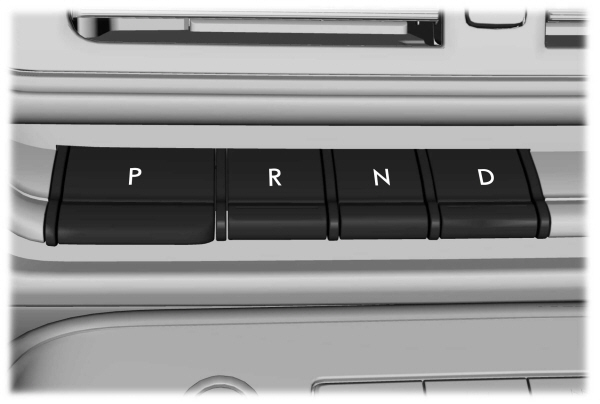
Your vehicle has an electronic transmission shifter. The transmission selector is on the center stack below the touchscreen.
P Park. R Reverse.N Neutral.D Drive. |
The instrument cluster displays the current position.
Note:
The position could illuminate on the transmission selector.
Park (P)
With the transmission in park (P), your vehicle locks the transmission and prevents the wheels from turning. Always come to a complete stop before putting your vehicle into and out of park (P). An audible tone sounds once you select park (P).
When you switch the ignition off, your vehicle shifts into park (P). If you switch the ignition off while your vehicle is moving, the transmission first shifts into neutral (N) until it reaches a speed less than
3 mph (5 km/h) and then shifts into park (P).
The electric parking brake could apply when you shift to park (P) without the brake pedal fully pressed. The electric parking brake applies when you shift to park (P) on large slopes. The electric parking brake releases with the drive away release function, or manually as described in the Releasing the Electric Parking Brake section. See
Electric Parking Brake.
Note:
A warning tone sounds if you open the driver door and you have not shifted the transmission selector to park (P).
Reverse (R)
With the transmission selector in reverse (R), your vehicle moves backward. Always come to a complete stop before shifting into and out of reverse (R).
Neutral (N)
With the transmission selector in neutral (N), you can start your vehicle and it is free to roll. Hold the brake pedal down when in this position.
Drive (D)
Drive (D) is the normal driving position for the best fuel economy and smoothness. Shift the transmission selector to drive (D) to allow your vehicle to move forward and shift through the forward gears.
The transmission shifts to the appropriate gear for optimum performance based on ambient temperature, road slope, vehicle load and your input.
Automatic Return to Park
Your vehicle shifts into park (P) when your vehicle is stationary and any of the following occur:- You switch the vehicle off.
- You open the driver door with your seatbelt unlatched.
- You unlatch the driver seatbelt when the driver door is open.
Note:
Do not use automatic return to park (P) when your vehicle is moving, except in an emergency.
Automatic return to park (P) may not work if the door ajar switch is malfunctioning.
See an authorized dealer if any of the following occur:- Door ajar indicator does not illuminate with the driver door open.
- Door ajar indicator illuminates with the driver door closed.
- Transmission not in park message appears with the driver door closed, after you shift out of park (P). You unlatch the driver seatbelt when the driver door is open.
Stay in Neutral Mode
This mode keeps your vehicle in neutral (N) when you switch your vehicle off. Use this mode at an automatic car wash if you exit your vehicle, or switch your vehicle off.
Note:
Automatic return to park (P) is delayed when your vehicle is in this mode.
Your vehicle could shift to park (P) after 30 minutes, or when the vehicle battery charge level is low. Prolonged use of this mode can cause the vehicle battery to run out of charge.
Do not tow your vehicle in this mode. Failure to follow these instructions could result in vehicle damage not covered by the vehicle warranty.
Entering Temporary Neutral Mode
- Power your vehicle on.
- Bring your vehicle to a complete stop.
- Press and hold the brake pedal.
- Shift into neutral (N).
Note:
An instructional message appears.
- Press the neutral (N) button.
Note:
A confirmation message appears when your vehicle enters the mode.
- Release the brake pedal.
Note:
Your vehicle is free to roll.
- Switch your vehicle off.
Note:
Do not tow your vehicle in this mode.
Note:
The neutral (N) indicator on the transmission selector may flash in this mode.
Exiting Temporary Neutral Mode
- Press the brake pedal.
- Shift into park (P), or power your vehicle on and shift into drive (D) or reverse (R).
Manually Shifting Gears
The instrument cluster displays the current gear. The current gear flashes when your vehicle cannot shift into the requested gear. Your vehicle will not shift if the requested gear raises or lowers the engine speed beyond the limit.
Your vehicle could shift when you fully press the accelerator or brake pedal.
Note:
Prolonged driving with high engine speed could cause vehicle damage not covered by vehicle warranty.
Note:
Drive modes could affect when the vehicle shifts into the requested gear.
Manually Shifting Gears in Drive (D)
Use this feature to temporarily change gear.
Note:
We recommend using this feature for engine braking or driving on hilly or mountainous roads.
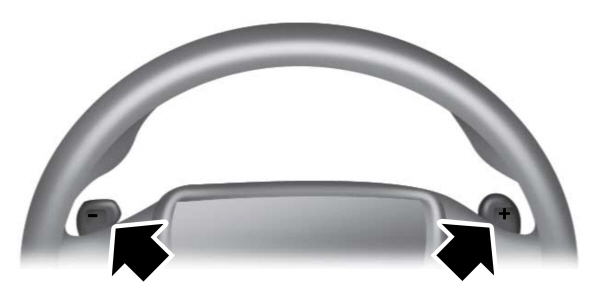
- Pull any paddle to switch the feature on.
- Pull the right (+) paddle to upshift.
- Pull the left (-) paddle to downshift.
- Hold the + paddle for a few seconds to switch the feature off.
Note:
The feature switches off after a short period of time if neither paddle is pulled.
Manual Park Release
|
WARNING:
When doing this procedure, you need to take the transmission out of park (P) which means your vehicle can roll freely. To avoid unwanted vehicle movement, apply the parking brake prior to doing this procedure. Use wheel chocks if appropriate.
WARNING:
If the parking brake is fully released, but the brake warning lamp remains illuminated, the brakes may not be working properly. Have your vehicle checked as soon as possible.
WARNING:
Do not drive your vehicle until you verify that the stoplamps are working. |
Use the manual park release to move your transmission from the park (P) position in the event of an electrical malfunction or emergency.
Activating the Manual Park Release Cable
- Apply the parking brake.See Electric Parking Brake.
Note:
If the vehicle battery is dead, for example, no electrical power is available, you could require an external power source to apply the parking brake.
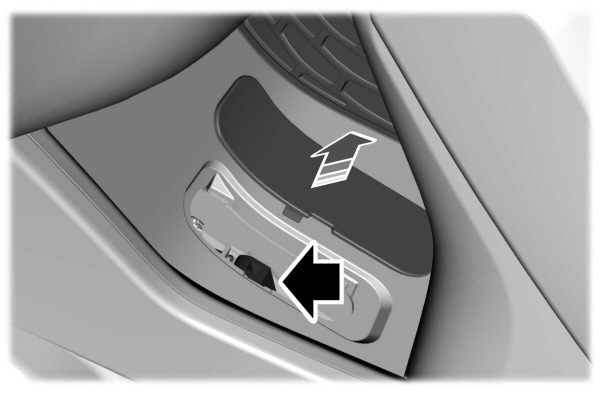
- Using a flat head screwdriver 4.7 in (120 mm), carefully open the access cover under the arm rest console.
- Turn the vehicle ignition on without starting the vehicle. Press the push to start button without pressing the brake.
- Once in the driver seat, fully apply the brake pedal and hold. Do not release.
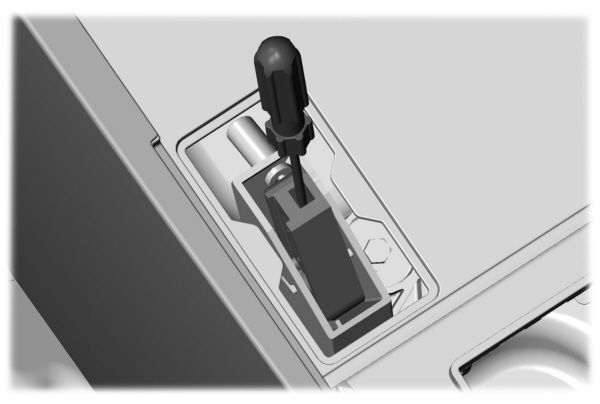
- Insert a screwdriver fully into the Manual Park Release lever slot, pull the Manual Park Release lever toward the rear until the detent in the slot pops up against the screwdriver. Allow 0.3 in (7 mm) of full upward travel of the detent, which locks in the park override mode, and you can remove the screwdriver. If done correctly, a message on the instrument cluster displays Park Not Available, Transmission Not in Park or Shift System Fault.
Note:
A screwdriver tool longer than
4.7 in (120 mm) could hit the underside of the armrest console before you achieve full travel of the detent.
- With your foot still fully applied on the brake pedal, disengage the parking brake. See Electric Parking Brake.
- Your vehicle remains in neutral (N) for emergency towing purposes.
- Switch off the ignition.
- Once it is safe to do so, and there is no risk of your vehicle rolling, disconnect the negative, black, battery cable from the battery.
Returning Your Vehicle to Normal Mode
- Once it is safe to do so, reconnect the negative, black, battery cable to the battery.
- Apply the parking brake.See Electric Parking Brake.
Note:
If the vehicle battery is dead, you could require an external power source to apply the parking brake.
- Fully apply the brake pedal and hold, do not release.
- Insert the screwdriver fully into the Manual Park Release lever slot. Push the tool downwards. The system detent releases and the Manual Park Release lever moves forward, allowing the vehicle to go back into the park (P) position. Remove the screwdriver.
- Install the access cover.
- With your foot fully applied on the brake pedal, start your vehicle. Confirm that your vehicle is in the park (P) position and that the instrument cluster indicates park (P).
- If the instrument cluster does not display the park (P) position or there is a message stating Park Not Available, Transmission Not In Park or Shift System Fault, apply the parking brake before exiting your vehicle. Contact an authorized dealer.
If Your Vehicle Gets Stuck in Mud or Snow
If your vehicle gets stuck in the mud or snow, you can rock it out by shifting between forward and reverse gears, stopping between shifts in a steady pattern. Press lightly on the accelerator in each gear.
Note:
Do not rock the vehicle if the engine is not at normal operating temperature or damage to the transmission could occur.
Note:
Do not rock the vehicle for more than a minute or damage to the transmission and tires could occur, or the engine could overheat.
- Please note that Ford will not respond to individual feedback.
- Please only provide detailed feedback regarding any inaccuracies in the content or any missing content in the Owner's Manual.
- Your feedback will be investigated, and any necessary changes will be updated in the online Owner's Manual.
- Please do not submit any vehicle related feedback. To submit feedback related to your vehicle, please click the link to find the correct contact information for your market.
Your input is valuable in helping us improve our Owner's Manual. Thank you for taking the time to provide your feedback.
North America
| Country | Phone | |
|---|---|---|
| United States | 1-800-392-3673 (FORD) | |
| Canada | 1-800-565-3673 (FORD) | |
| Mexico | 1-800-719-8466 | |
| Guam | 1-800-392-3673 (FORD) | |
| North Mariana Islands | apemcrc@ford.com | |
| Puerto Rico | (800) 841-3673 | prcac@ford.com |
| US Virgin Islands | (800) 841-3673 | prcac@ford.com |
IMG
| Country | Phone | |
|---|---|---|
| Algeria | nafcrc@ford.com | |
| Angola | ssacrc@ford.com | |
| Benin | ssacrc@ford.com | |
| Botswana | ssacrc@ford.com | |
| Burkina FASO | ssacrc@ford.com | |
| Burundi | ssacrc@ford.com | |
| Cameroon | ssacrc@ford.com | |
| Cape Verde | ssacrc@ford.com | |
| Central African Republic | ssacrc@ford.com | |
| Chad | ssacrc@ford.com | |
| Comoros | ssacrc@ford.com | |
| Dem Republic of Congo | ssacrc@ford.com | |
| Djibuti | ssacrc@ford.com | |
| Egypt | nafcrc@ford.com | |
| Equitorial Guinea | ssacrc@ford.com | |
| Eritrea | ssacrc@ford.com | |
| Ethiopia | ssacrc@ford.com | |
| Gabon | ssacrc@ford.com | |
| Gambia | ssacrc@ford.com | |
| Ghana | ssacrc@ford.com | |
| Guinea | ssacrc@ford.com | |
| Guinea-Bissau | ssacrc@ford.com | |
| Ivory Coast | ssacrc@ford.com | |
| Kenya | ssacrc@ford.com | |
| Liberia | ssacrc@ford.com | |
| Libya | nafcrc@ford.com | |
| Madagascar | ssacrc@ford.com | |
| Malawi | ssacrc@ford.com | |
| Mauritania | ssacrc@ford.com | |
| Mauritius | ssacrc@ford.com | |
| Morocco | nafcrc@ford.com | |
| Mozambique | ssacrc@ford.com | |
| Namibia | ssacrc@ford.com | |
| Niger | ssacrc@ford.com | |
| Nigeria | ssacrc@ford.com | |
| Republic of Congo | ssacrc@ford.com | |
| Rwanda | ssacrc@ford.com | |
| Sao Tome and Principe | ssacrc@ford.com | |
| Senegal | ssacrc@ford.com | |
| Sychelles | ssacrc@ford.com | |
| Sierra Leone | ssacrc@ford.com | |
| South Africa | 860011022 | fordcrc2@ford.com |
| South Sudan | ssacrc@ford.com | |
| Swaziland | ssacrc@ford.com | |
| Tanzania | ssacrc@ford.com | |
| Togo | ssacrc@ford.com | |
| Tunisia | nafcrc@ford.com | |
| Uganda | ssacrc@ford.com | |
| Zambia | ssacrc@ford.com | |
| Zimbabwe | ssacrc@ford.com | |
| American Somoa | apemcrc@ford.com | |
| Australia | (13 FORD) 13 3673 | foacust1@ford.com |
| Bangladesh | apemcrc@ford.com | |
| Bhutan | apemcrc@ford.com | |
| Brunei | apemcrc@ford.com | |
| Cambodia | apemcrc@ford.com | |
| Fiji | apemcrc@ford.com | |
| French Polynesia | apemcrc@ford.com | |
| India | apemcrc@ford.com | |
| Indonesia | apemcrc@ford.com | |
| Japan | apemcrc@ford.com | |
| Laos | apemcrc@ford.com | |
| Macao | apemcrc@ford.com | |
| Malaysia | apemcrc@ford.com | |
| Marshall Islands | apemcrc@ford.com | |
| Mongolia | apemcrc@ford.com | |
| Myanmar | apemcrc@ford.com | |
| Nepal | apemcrc@ford.com | |
| New Caledonia | apemcrc@ford.com | |
| New Zealand | 0800 367 369 (FORDNZ) | fnzcust@ford.com |
| Pakistan | apemcrc@ford.com | |
| Palau | apemcrc@ford.com | |
| Papua New Guinea | apemcrc@ford.com | |
| Philippines | 02-88669408 | emailus@ford.com |
| Singapore | apemcrc@ford.com | |
| South Korea | 82-2-1600-6003 | infokr1@ford.com |
| Sri Lanka | apemcrc@ford.com | |
| Tahiti | apemcrc@ford.com | |
| Thailand | 1383 | fordthai@ford.com |
| Timor Leste | apemcrc@ford.com | |
| Vanuatu | apemcrc@ford.com | |
| Vietnam | 1800588888 | fordvn@ford.com |
| Wallis and Futuna | apemcrc@ford.com | |
| Western Somoa | apemcrc@ford.com | |
| Afghanistan | menacac@ford.com | |
| Bahrain | menacac@ford.com | |
| Iraq | menacac@ford.com | |
| Israel | 08-9139995 | service1@kelekmotors.co.il |
| Jordan | menacac@ford.com | |
| Kuwait | 965 1 898900 | menacac@ford.com |
| Lebanon | menacac@ford.com | |
| Oman | menacac@ford.com | |
| Qatar | menacac@ford.com | |
| Saudi Arabia | 8008443673 | menacac@ford.com |
| Syria | menacac@ford.com | |
| United Arab Emirates | 80004441066 | menacac@ford.com |
| Yemen | menacac@ford.com |
Greater China
| Country | Phone | |
|---|---|---|
| China-Imported Vehicles | 400-690-1886 | |
| China-CAF | 951995 | |
| China-JMC | 400-003-1111 | |
| China-Lincoln | 400-988-6789 | |
| Taiwan | 0800-032100 | |
| Hong Kong | (852) 3768-4898 |
South America
| Country | Phone | |
|---|---|---|
| Argentina | 0800-888-3673 | |
| Bolivia | Contact Your Local Ford Distributor | |
| Brazil | 0800-703-3673 | central@ford.com |
| Chile | Contact Your Local Ford Distributor | |
| Colombia | Contact Your Local Ford Distributor | |
| Ecuador | Contact Your Local Ford Distributor | |
| French Guiana | Contact Your Local Ford Distributor | |
| Guyana | Contact Your Local Ford Distributor | |
| Paraguay | Contact Your Local Ford Distributor | |
| Peru | Contact Your Local Ford Distributor | |
| Suriname | Contact Your Local Ford Distributor | |
| Uruguay | Contact Your Local Ford Distributor | |
| Venezuela | Contact Your Local Ford Distributor |
Europe
| Country | Phone | |
|---|---|---|
| Albania | Contact Your Local Ford Distributor | |
| Andorra | Contact Your Local Ford Distributor | |
| Armenia | Contact Your Local Ford Distributor | |
| Austria | 01 20 609 2424 | kundenz@ford.com |
| Azerbaijan | Contact Your Local Ford Distributor | |
| Belarus | Contact Your Local Ford Distributor | |
| Belgium | 32 2 700 67 76 | custfobe@ford.com |
| Bosnia | Contact Your Local Ford Distributor | |
| Bulgaria | Contact Your Local Ford Distributor | |
| Croatia | Contact Your Local Ford Distributor | |
| Cyprus | Contact Your Local Ford Distributor | |
| Czech Republic | 800 3673 29 | zakaznik@ford.com |
| Denmark | 43 68 2000 | crcdk@ford.com |
| Estonia | 372 6710 060 | ford@infoauto.ee |
| Falkland Islands | Contact Your Local Ford Distributor | |
| Finland | 09 725 22022 | palvelut@ford.com |
| France | 0800 005 005 | crcfr@ford.com |
| Georgia | Contact Your Local Ford Distributor | |
| Germany | 0221 9999 2 999 | kunden@ford.com |
| Girbraltar | Contact Your Local Ford Distributor | |
| Greece | 216 900 88 99 | info11@ford.com |
| Hungary | +36 1 7777 555 | Contact Your Local Ford Distributor |
| Iceland | Contact Your Local Ford Distributor | |
| Ireland | 1800 771 199 | crcirela@ford.com |
| Italy | 800 22 44 33 | tu@ford.com |
| Kazakhstan | Contact Your Local Ford Distributor | |
| Latvia | +371 67303020 | |
| Liechtenstein | Contact Your Local Ford Distributor | |
| Lithuania | 370 5216 8226 | forduzklausos@inchcape.lt |
| Luxembourg | +352 248 71 800 | custfobe@ford.com |
| Macedonia | Contact Your Local Ford Distributor | |
| Malta | Contact Your Local Ford Distributor | |
| Moldova | Contact Your Local Ford Distributor | |
| Monaco | Contact Your Local Ford Distributor | |
| Montenegro | Contact Your Local Ford Distributor | |
| Netherlands | 70 7703 777 | klanten@ford.com |
| Norway | 47 66819739 | infonor@ford.com |
| Poland | 48 22 522 27 27 | kontakty@ford.com |
| Portugal | 800 210 373 | clientes@ford.com |
| Romania | 40 312298798 | crcro@ford.com |
| Russia | Contact Your Local Ford Distributor | |
| San Marino | Contact Your Local Ford Distributor | |
| Serbia | Contact Your Local Ford Distributor | |
| Serbia and Montenegro | Contact Your Local Ford Distributor | |
| Slovakia | Contact Your Local Ford Distributor | |
| Slovenia | Contact Your Local Ford Distributor | |
| South Georgia | Contact Your Local Ford Distributor | |
| Spain | 900 80 70 90 | crcspain@ford.com |
| Sweden | 08-593 66 333 | fordkund@ford.com |
| Switzerland | 044 511 14 45 | assistch@ford.com |
| Turkey | Contact Your Local Ford Distributor | |
| Ukraine | Contact Your Local Ford Distributor | |
| United Kingdom | 020 3564 4444 | UKCRC1@ford.com |
Caribbean and Central America
| Country | Phone | |
|---|---|---|
| Anguilla | (313) 594-4857 | expcac@ford.com |
| Antigua | (313) 594-4857 | expcac@ford.com |
| Aruba | (313) 594-4857 | expcac@ford.com |
| Bahamas | (313) 594-4857 | expcac@ford.com |
| Barbados | (313) 594-4857 | expcac@ford.com |
| Bermuda | (313) 594-4857 | expcac@ford.com |
| Bonaire and St. Eustatius | (313) 594-4857 | expcac@ford.com |
| Cayman Islands | (313) 594-4857 | expcac@ford.com |
| Curacao | (313) 594-4857 | expcac@ford.com |
| Dominica | (313) 594-4857 | expcac@ford.com |
| Dominican Republic | (313) 594-4857 | expcac@ford.com |
| Grenada | (313) 594-4857 | expcac@ford.com |
| Haiti | (313) 594-4857 | expcac@ford.com |
| Jamaica | (313) 594-4857 | expcac@ford.com |
| Martinique | (313) 594-4857 | expcac@ford.com |
| Montserrat | (313) 594-4857 | expcac@ford.com |
| St. Kitts and Nevis | (313) 594-4857 | expcac@ford.com |
| St. Lucia | (313) 594-4857 | expcac@ford.com |
| St. Martin | (313) 594-4857 | expcac@ford.com |
| St. Vincent and the Grenadines | (313) 594-4857 | expcac@ford.com |
| Trinidad and Tobago | (313) 594-4857 | expcac@ford.com |
| Turks and Caicos | (313) 594-4857 | expcac@ford.com |
| British Virgin Islands | (313) 594-4857 | expcac@ford.com |
| Netherlands Antilles | (313) 594-4857 | expcac@ford.com |
| Belize | (313) 594-4857 | expcac@ford.com |
| Costa Rica | (313) 594-4857 | expcac@ford.com |
| El Salvador | (313) 594-4857 | expcac@ford.com |
| Guatemala | (313) 594-4857 | expcac@ford.com |
| Honduras | (313) 594-4857 | expcac@ford.com |
| Nicaragua | (313) 594-4857 | expcac@ford.com |
| Panama | (313) 594-4857 | expcac@ford.com |